What to Expect When Working With a Web Designer
Hiring a web designer for the first time can feel like stepping into unfamiliar territory. You know you need a website, but you have no idea what the process looks like. Here's a transparent, step-by-step walkthrough so there are no surprises.
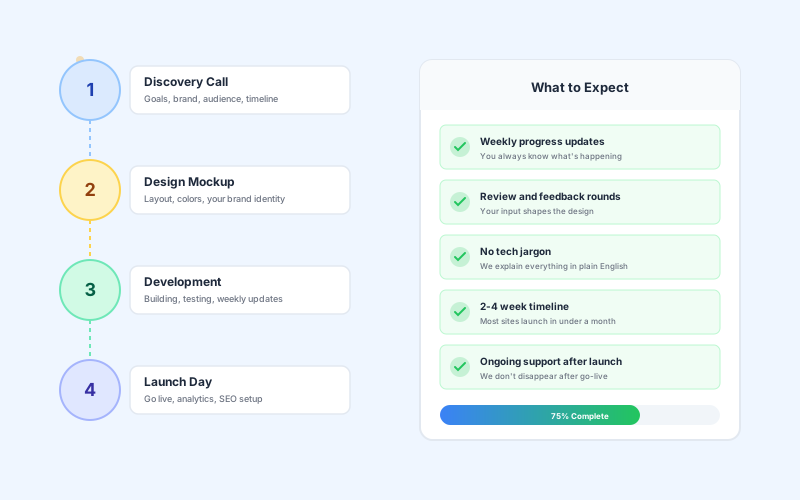
The Biggest Fear: Not Knowing What's Happening
We hear this constantly from small business owners in the Shenandoah Valley: “I hired someone to build a website and they just disappeared for three months.” That's not how it should work.
A good web designer keeps you in the loop from day one. You should never feel like you're in the dark about what's happening with your own project. Here's what a professional process looks like.
Step 1: The Discovery Call
Timeline: Day 1
This is a casual conversation — not a sales pitch. A good designer wants to understand:
- What your business does and who your customers are
- What you want your website to accomplish (leads, information, bookings)
- Whether you have existing brand materials (logo, colors, photos)
- Your timeline and budget expectations
- Websites you like (and don't like) for reference
What you should NOT hear: Jargon. If a designer is throwing around terms like “headless CMS” or “server-side rendering” without explaining what they mean, that's a red flag. You're a business owner, not a developer. A good designer speaks your language.
Step 2: Design & Mockup
Timeline: Week 1
Before any code is written, you'll see a visual mockup of your website. This is where your brand comes to life. You'll see:
- The layout and structure of your homepage
- Color scheme based on your brand
- Typography choices
- Where your content and images will go
- How the navigation will work
Your job here: Give honest feedback. Don't be afraid to say “I don't like that” or “Can we try something different?” This is the easiest time to make changes. Good designers welcome feedback — they'd rather get it right now than redo work later.
Step 3: Development
Timeline: Weeks 2-3
This is where the approved design gets built into a real, working website. During development, you should receive:
- Weekly progress updates (at minimum)
- A staging link to preview the work in progress
- Opportunities to give feedback on functionality
- Honest updates if anything is taking longer than expected
Red flag: If your designer goes silent during this phase and you don't hear from them for weeks, something is wrong. Communication should never stop during a project.
Step 4: Launch Day
Timeline: Week 3-4
Before going live, your designer should walk you through:
- Final review of every page on desktop and mobile
- Testing all forms, links, and functionality
- Setting up Google Analytics to track visitors
- Submitting your sitemap to Google Search Console
- Connecting your domain name
- Training you on anything you need to manage yourself
What You'll Need to Provide
Your web designer will handle the design and development, but they'll need some things from you. Don't worry — none of this needs to be perfect:
- Your logo (even if it's just a rough version)
- Photos of your work, team, or business (phone photos are fine to start)
- A rough idea of what pages you want (Home, About, Services, Contact is a common starting point)
- Content direction (you don't need to write perfect copy — bullet points work)
- Login access to your domain registrar (GoDaddy, Namecheap, etc.)
For a more detailed guide, check out our post on what to prepare before starting your web project.
Questions to Ask Before You Hire
Before signing anything, ask these questions. The answers will tell you a lot about whether the designer is right for you:
- “Can I see examples of your work?” — If they can't show you live websites, move on.
- “How will we communicate during the project?” — You should know the cadence upfront.
- “What happens after launch?” — The best designers offer ongoing support, not just a hand-off.
- “Do I own my website?” — You should own your domain, content, and code.
- “What's included in the price?” — Hosting? Maintenance? Security? Content updates?
What Happens After Launch?
A website isn't a “set it and forget it” project. After launch, you'll want:
- Regular security updates to keep your site safe
- Performance monitoring to ensure fast load times
- Content updates as your business evolves
- SEO adjustments based on how people are finding you
- Analytics reviews to understand what's working
Some designers hand you the keys and disappear. Others include ongoing support in their pricing. We strongly recommend the latter — especially if you're not technically inclined. Your website needs regular care, just like any other part of your business.
The Bottom Line
Working with a web designer should feel collaborative, not confusing. You should always know what's happening, what's coming next, and how to give feedback. If the process feels opaque or intimidating, that's a sign the designer isn't communicating well enough.
The right designer will make the experience enjoyable. You'll see your business come to life online, and you'll wonder why you didn't do it sooner.
Ready to Get Started?
We keep the process simple. Discovery call, design, build, launch — typically in 2-4 weeks. Weekly updates, no jargon, and ongoing support included. Starting at $85/month.
Looking for a web designer in the Shenandoah Valley?
We build websites for businesses across the Valley. See what we offer in your area:
Written by
Mosaic Ridge Team