How to Write Website Content That Converts
You built a beautiful website. The design looks great. But nobody is filling out your contact form. The problem isn't your design — it's your words. Here's how to write content that turns visitors into customers.
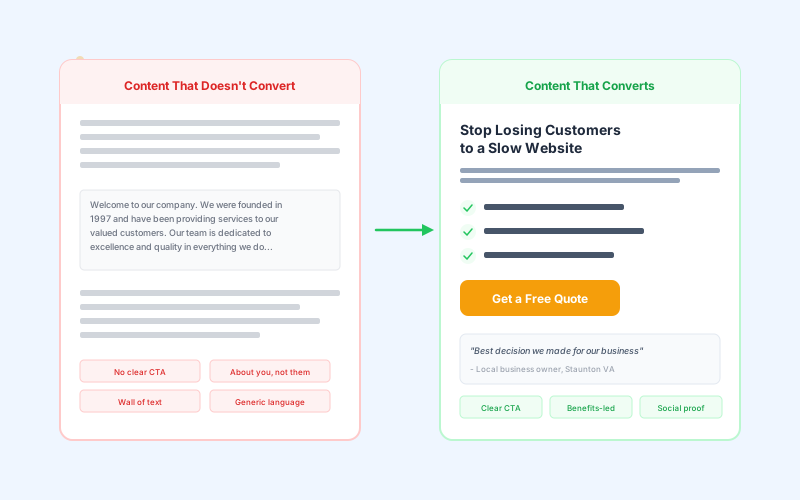
The #1 Mistake: Writing About Yourself
Here's the most common content mistake we see on small business websites in the Shenandoah Valley:
What most businesses write:
“Welcome to ABC Company. We were founded in 2005 and have been providing quality services to our valued customers for over 20 years. Our team of dedicated professionals is committed to excellence in everything we do.”
The problem? This is all about you. Your customer doesn't care about your founding date. They care about whether you can solve their problem.
What you should write instead:
“Tired of your leaky faucet ruining your weekend? We fix plumbing problems in Staunton fast — usually same-day. No hourly surprises. Just a fair quote and honest work.”
See the difference? The second version speaks directly to the customer's problem and immediately tells them what you'll do about it.
The Formula for Content That Converts
You don't need to be a professional copywriter. Follow this simple framework for every page on your website:
1. Lead With the Customer's Problem
Your headline should address what your customer is struggling with, not what you do. People are searching for solutions, not companies.
Instead of:
“Professional Lawn Care Services”
Try:
“Get the Best-Looking Lawn on Your Street”
2. Use Benefits, Not Features
Features describe what you do. Benefits describe what the customer gets. Always focus on benefits.
Feature:
“We use Trex composite decking”
Benefit:
“A beautiful deck that never needs staining or replacing”
3. Write Like You Talk
Forget what you learned in English class. Website content should be conversational and easy to scan. Use short sentences. Short paragraphs. Simple words. If you wouldn't say it to a customer standing in front of you, don't put it on your website.
4. Include One Clear Call to Action
Every page should answer the question: “What do I want the visitor to do next?” Then make it obvious.
Vague:
“Contact us for more information”
Specific:
“Get Your Free Quote in 24 Hours”
5. Add Social Proof
Testimonials, reviews, and case studies do more selling than any paragraph you could write. Include real quotes from real customers. Even a simple “Rated 5 stars on Google” badge adds credibility.
Page-by-Page Content Guide
Here's what each page on your website should focus on:
| Page | Primary Goal | Key Content |
|---|---|---|
| Homepage | Build trust & direct to action | Clear headline, 3 benefits, testimonial, CTA |
| About | Build personal connection | Your story through the customer's lens, team photos |
| Services | Explain what you offer | Benefits of each service, pricing hints, CTA per service |
| Contact | Make it easy to reach you | Short form, phone, email, hours, map |
| Blog | Attract search traffic | Helpful answers to questions your customers ask |
Content Formatting Tips
How your content looks matters almost as much as what it says. People scan websites — they don't read them word by word.
- Break up text with headings — Use H2s and H3s to organize content into scannable sections
- Keep paragraphs short — 2-3 sentences max. Long paragraphs look like walls of text on mobile
- Use bullet points — Lists are easier to scan than paragraphs
- Bold key phrases — Help scanners catch the important parts
- Add images between text sections — Break up the visual monotony
- Use white space — Don't cram everything together. Let the content breathe
The “So What?” Test
After you write any piece of content, read it back and ask: “So what? Why would my customer care about this?” If you can't answer that clearly, rewrite it.
- “We have 20 years of experience” → So what? → “We've solved every plumbing problem you can think of”
- “We use the latest technology” → So what? → “Your website loads in under 2 seconds”
- “We offer quality service” → So what? → “95% of our customers refer us to friends”
Every claim should be backed up with a specific benefit or proof. Vague statements like “quality” and “excellence” mean nothing to your customer.
Local Content That Ranks
For businesses in the Shenandoah Valley, mentioning your location naturally in your content helps you show up in local searches. Don't stuff keywords, but do include:
- Your city name in your headline (“Staunton's Trusted Electrician”)
- Surrounding service areas in your content (Harrisonburg, Waynesboro, Lexington)
- Local references that feel natural (“serving the Valley since...”)
- Blog posts that answer local questions
This pairs perfectly with your Google Business Profile and overall local SEO strategy.
Need Help With Your Website Content?
We don't just build websites — we help you create content that actually generates leads. Every site we build includes content guidance and SEO optimization. Starting at $85/month.
Looking for a web designer in the Shenandoah Valley?
We build websites for businesses across the Valley. See what we offer in your area:
Written by
Mosaic Ridge Team